Showing posts with label call to action. Show all posts

Thursday, 9 March 2017

10 Best Practices for Designing Call-to-Action’s that Convert


Lead generation can be a nightmare sometimes.

In an ideal scenario, a potential customer comes to your website, learns all about you, converts, becomes a customer, and you get to have an amazing customer relationship with him.

But let’s be truthful here - a lot of times, customers come to your website, hoping to have an amazing customer journey, only to get lost! This happens if your conversion path is not clear.

This is where CTAs come in; They take your potential customers to a landing page where they can enter their contact information or complete any short form. 

A call-to-action is a link or a button that is placed on your website to convert prospective buyers to leads. Also, a CTA acts as a bridge between the content that your customer is interested in, and a landing page that persuades your customer to complete a form.

Designing CTAs is a skill in itself. Given the fact that humans have a shorter attention span than a humble Goldfish, a CTA must capture a visitor’s attention as fast as possible. Also, a CTA must be in-tune with other elements on the page and must be effectively designed. 

A great CTA is a combination of great text and an effective design. To give you a dose of inspiration for designing CTAs, we’ve listed out 15 CTAs that totally nail it! 

Effective Text

1. Get Specific

Words like “enter” and “submit” have become things of past! Use an action-packed verb to get the visitor’s attention immediately. Your action words must go along with your subject text. To make your CTA brim with effectiveness, be more descriptive about the action. Tell what the user will be getting if they click through. 

Here’s an easy trick to do it - use verbs that reflect a benefit and an action that you want your visitor to complete.

For example, instead of “Sign Up with XYZ”, try using “Reserve your Place with XYZ Now!”.

Learn From - Ekklesia 360

Look how convincing “See How it Works” is! It reflects what the Ekklesia wants the visitor to do. Should we even mention the text above the CTA is as convincing as the CTA itself.


How not to do it - Macy’s

This page is about everything! The cluttered layout and too much text will make you miss the promo code. There is a lot of text about furnitures, mattresses and rugs.


2) Make your USP the CTA

What differentiates you from other businesses in the market? What is it that you are actually offering to the customer apart from the product itself? Try making these your CTA text. Your value proposition might be “Free” or “More” or “Increase”, figure out how to display it the best in your call-to-action button.

Learn From - Netflix

Look how Netflix uses the word “Free” in its CTA. Also, the CTA is very clear in conveying that the subscription is free for a month only. But, look at the text above - it says “Cancel anytime”. With that reassurance, why wouldn’t you join free for a month? 


3) Consistency is the Key

Consistency is very important when it comes to CTA copy. You make to make it very clear to your visitors what they have to do next and why they must do it and so, your CTA must directly reflect the essence of the content that came before it. For example, if your CTA button is at the end of a blog article titled “X Ways to Boost Your Facebook Following” and you want people to sign up for a webinar about social media marketing, don’t feature a CTA that just says, “Sign Up for a Webinar”. Make it reminiscent of the content above like, “Boost your Facebook Following with this free seminar”.

Learn from - Neil Patel

Look at how this text and CTAs as consistent throughout the page. The CTA is clear and synchronous with the tone & subject of the page. 


4) Create a Sense of Urgency

Change your CTAs such that it creates a sense of urgency, NOW! You only have a small amount of time to convince your customers to take action. Hence, you should not offer your customers a chance to procrastinate. An effective CTA will tempt the customer to click on it right then. It is also a good idea to tell your customers what they stand to gain if they take action immediately. How about “Book now to get a 15% discount”?

Learn From - Zynga

Zynga wants you to play. Not later, but NOW! 


5) Use Personal Language

Let your CTA be all about your visitors and how you’re putting them first. They came to your landing page looking to fulfil a need. Show them that you’re here to fulfil their need with your service or product. Also, your CTA should not feel like it is being targeted to a group. Add a personal touch to plain CTAs to make it more effective. See how different “Sign Me Up For This!” is different in tone from “Sign Up”. According to statistics, the second person “Your” constantly outperforms “My”

Learn From - Wishpond

This pop-up features a bit of information about their landing page builder and the user is immediately shown a CTA, “Build My Page”. This CTA gives the visitor a feeling of possession and puts them in control.


Effective Designs

6) Use Contrasting Colors

An easy trick to make your CTA stand out is to highlight it and create a contrast with the surrounding content. Vibrant and energetic colors are great for drawing attention and creating contrast. If you are stuck and can’t decide on a particular contrasting color, look at the most common colors or the schema used on your landing page, and pick the opposite color. If you still can’t decide, bright red, orange and lively green always seem to do the trick! 

Learn From - Bath & Body Works

The pink background, white text and the green CTA - the entire element is so well conceived and in tone with their Christmas-sy design. We’re particularly impressed with the choice of colors and how the green button stands out from the pink background!


How not to do it - Mr.Porter

Here’s an example of how having same colors all over the page could possibly affect your conversion rate. In this landing page from Mr. Porter, the “Shop Now” button doesn’t stand out too well. For an user who is just skimming through the page, the CTA would be non-existent!


7) Put it in Place

One very important factor to remember when trying to draw attention on your CTA is its location. While pop-up CTAs have a conversion rate of up to 8%, sidebar CTAs have a conversion rate of 1.5%. If the customer is not able to find a CTA in the right place when they are willing to take action, a valuable sales opportunity might be lost. So, where exactly do you place your CTA? That depends on what the CTA is trying to achieve. If it is for a demo, place it prominently on pages that show intention. If it for a guide book or a webinar, place it towards the end of a blog article. 

Learn From - General Assembly

Look at how General Assembly has strategically placed the “Subscribe” CTA in the end! While there is another CTA, “View Full-Time Courses”, it is clear that both the CTAs have been created for different actions. While one is placed at the middle of the page, “Subscribe” is placed at the bottom to let the user take-in all supporting information and hence, prompting better action.


(By hubspot)

8) Choose the Right Color

Different group of people respond well to different set of colors. While teal attracts people looking for budget options, red-orange attracts impulse buyers. It is very important that you understand the psychology of color and also understand what your average buyers are looking for, before you choose a color. Also, think about the color of your brand. Color association increases brand recognition which in turn, affects consumer confidence.

Call to Action Examples
Source: Wishpond.

Learn From - Macys’

Look at how the red color CTA not only contrasts from surrounding elements but also grabs the attention of customers. It is a simple, clear and direct message placed on the right color that does the trick for Macy’s.


9) Make it Fit In

Sure, bigger CTA’s scream for attention. But having too large a CTA might get lost due to banner blindness. Make sure your CTA element is sized big enough to read. The CTA size must also be mobile compatible. The key is to make the CTA look balanced with other design elements on page. 

Learn From - HowAboutWe

Notice how the CTA size is proportional and balanced with other boxes on the page? Now that’s what we’re talking about!


10) Button Shape

Users press CTA buttons throughout their daily life, all the time. You need to exploit this fact to create CTA designs that immediately tell the users what to do with it. Even though this is an area you can experiment with, you need to ensure that your CTA button looks like one.

Learn from - Wufoo

The background color, the button colors, the neatly formatted text and minimalistic design makes this page a winner. Look at the shape and size of the “Sign Up Free” CTA button that makes you want to click on it! 


How not to do it - Basecamp 3

Albeit a negative lesson, Basecamp’s CTA do tells us a few things. Notice the “See what’s new in 3” button that is designed like a speech balloon. Do you think people will instantly recognize that it is a CTA? If you button does not look like a clickable element, chances are people won’t click it.


Bonus infographic:

Everything You Need to Know About Call-to-Action Buttons

Everything You Need to Know About Call-to-Action Buttons [INFOGRAPHIC]
Courtesy of: Synecoretech.


Friday, 4 November 2016

A Beginner’s Social Media Guide for Small Businesses


Are you ready to connect with a wider audience?
Want to know the best ways to leverage social media for your small business?
If you haven’t used social media to market your products and services, you’re going to love how easy it is to get started.
In this article, I’ll show you seven steps you can take to make social media marketing work for you.

Why Social Media for Small Businesses?

As a startup or small business owner, you know there’s a lot to accomplish with limited resources.
Traditional marketing can be a drain on your funds. Social media marketing, on the other hand, is pretty low-cost and gives you a direct line to current and prospective customers.
istock keyboard image
Social media offers small businesses a cost-effective way to reach their customers. Image source: iStockPhoto.com.
It’s a trade-off though. What you save in dollars you’ll invest in time. You have to be smart and efficient with the resources you have to achieve the results you need.
This guide is for startup and small business owners with limited resources, but who want to learn how to establish and build their brand using social media.

#1: Do Your Homework

Behind every exceptional social media campaign is a great strategy.
Social media is all about connecting with your audience on an authentic level. To do that, you have to intimately understand your current and potential customers.
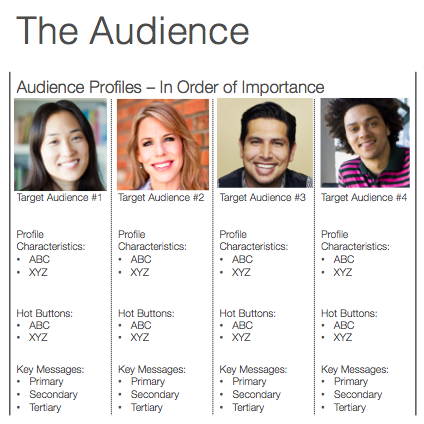
Start by defining your audience. Distinguish individual character profiles by age, gender, interests, profession, etc. Don’t just say it out loud. Write down the details and find images that represent your target audience.
Next, crystallize your message. Based on your defined target audience, what are the key problems or concerns you can address or solve? Expand on and define those pain points for each character and write it under each profile.
Below that, write down three key marketing messages you want to communicate to that audience.
audience profile details
Create profiles for your audience—it’ll help you target your messages to them.
Now that you’ve defined your audience and message, take the time to find out which social networks they prefer.
All social media channels are not created equal. Each one has a different primary audience, cadence and focus. It’s important to understand the differences so you expend your efforts on the right channels.

#2: Coordinate Your Social Channels

If you treat each social media platform as a stand-alone effort, your success will be limited. Your networks should work together to help you achieve your goals.
Your website is your brand’s home base. Coordinate your social media efforts to push people to your website where they can buy your product or service.
Use your blog to establish your brand’s voice and share information. It’s also a valuable opportunity to engage with your site visitors and lead them through your sales funnel.
You can optimize your website and blog for social media by adding a few easy elements to your design.
social icons on kimgarst.com
Kim Garst makes sure her social icons are seen on her front page.
If you want visitors to follow your various social profiles, make sure you display social icons prominently in your header or sidebar, like these shown on Kim Garst‘s site. They should link directly to your profiles so your readers can follow you immediately.
Include a call to action (CTA) at the end of your blog posts asking readers to like you on Facebook or follow you on Twitter (or whichever platforms you’ve determined are best for your audience).
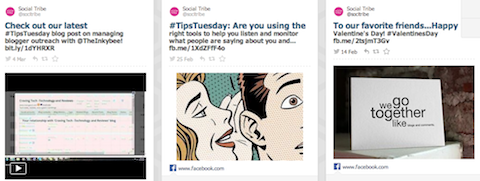
Integrate live social media feeds (e.g., Facebook and Twitter) so visitors can see your recent activity. When your audience can see what you’re sharing, they may be more likely to follow you.
Incorporate sharing buttons on your pages and posts to ensure that your content is share-friendly.
When people come across valuable content, they want to share it with their friends and followers. If you don’t have sharing buttons, your visitors will likely click away and you’ve lost that opportunity to reach a wider related audience.
rebelmouse feed display
Here’s how Rebel Mouse’s content feed displays across multiple social media channels.
Tool Tip: Socialize your website with Rebel Mouse, an all-in-one, real-time publishing, advertising and analytics platform.
Rebel Mouse aggregates all of your social media content and hosts a real-time feed on your website.
If you haven’t started an email newsletter, I encourage you to start one now. They’re an important way to stay in front of current and prospective customers.
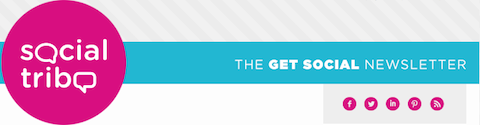
Your newsletter’s design should display social icons prominently and include a CTA inviting your audience to join your social media communities.
I suggest also featuring social media content that highlights community members or shares promotions or giveaways.
socialtribe enewsletter social icons
The Social Tribe eNewsletter displays all of its social media icons prominently.
Tool Tip: ClicktoTweet is an easy way to promote sound bites of your content, whether it’s through your website, blog or newsletter. It auto-populates a tweet with your message. Users just have to click on the link and hit send!

#3: Get Started, but Start Small

You’ve defined your target audience, you know where to reach them and you’ve optimized your other marketing touch points. It’s time to get social.
This is one of the most important pieces of advice to keep in mind, so listen up! Start small.
Social media takes time and energy, which are precious resources. Set yourself up for success by starting with a manageable load. I suggest you choose one or two platforms to start with.
The best way to guarantee consistency is to incorporate social media into your daily routine. Block out the time on your calendar, turn off all distractions and dedicate time to managing your social media accounts. Do this in one or two different time slots every day.
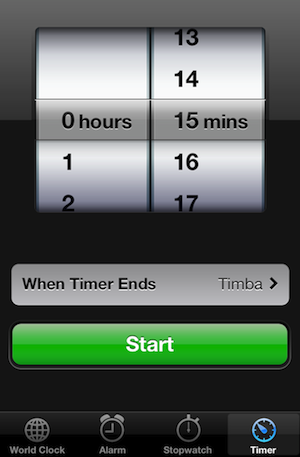
In your first month or two, expect to spend a minimum of 15-30 minutes a day on social activities. You can increase the time as you see fit.
timer clock
Use a timer to track your social activity time.
Remember those audience profiles and sample messages? Use them to determine what original and curated content you’ll share and create an editorial calendar to keep track of that content.
Your aim is to help your readers, so give them a tip they can use or share information that helps them solve a problem. When you give out relevant information, people come to view you as an expert.
Tool Tip: You’ll need a social media management tool to organize and manage your daily social media activities. HootSuite is a social media dashboard that offers monitoring, scheduling and analytic services. Sprout Social is another cost-effective tool that helps you find and schedule content and track social media performance.

#4: Listen and Share

Social media conversations are happening all around in real time.
Social listening is an excellent tactic to monitor what people are saying about your brand. Respond to comments, mentions and feedback even if they’re negative. You want to turn that negative into a positive!
Tool Tip: Mention app monitors the web, including the major social media channels, and tells you every time somebody mentions your name, brand or target keywords.
mention logo
Mention app is one of many tools you can use to listen for mentions of your brand on the web.
Content is the crux of social marketing. Unfortunately, combing through the Internet for good content to share can be slow and time-consuming.
To avoid getting bogged down, set up a process for organizing and aggregating quality content that provides value to your audience. Add the content to your editorial calendar and you can share it when you’re ready.
Tool Tip: Feedly is a magazine-style newsreader that aggregates content from different sources and organizes it for you. It’s a big time-saver when you’re looking for timely, relevant content to share!
feedly logo
Feedly is one way to aggregate content from around the web that’s related to your brand.

#5: Create Your Daily Plan

With a steady stream of content in the pipeline, you’re primed to post and engage on social media.
Make a list of the activities you plan to do every day. For example, comment on and/or link content on three different Facebook pages. On Twitter, tweet and retweet 3-5 times per day (you can schedule these).
If you’re using Pinterest, pin and repin 3-5 images per day. If LinkedIn is the best platform for your audience, share a link and like other people’s links.
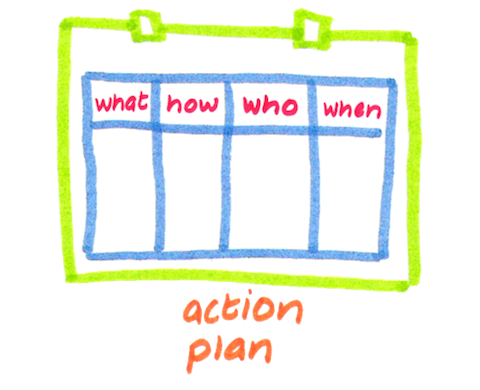
action plan outline
Make an action plan for your daily social media activities—and stick to it!
When you’re comfortable with those daily activities, join groups and communities to target specific demographicsInitiate and participate in more conversations by asking questions and posting comments to updates by others.
Continue to personalize your brand by welcoming new followers and thanking them for sharing your content or offering a compliment.
Above all, be intentional about your social activities. Success isn’t about chance, it’s about strategy and tactics.

#6: Boost Results With Social Advertising

If you want to accelerate your social media performance, it’s worth your time to explore paid advertising options.
Facebook offers a robust number of advertising solutions to help garner more sales, website traffic, brand exposure and audience engagement.
If Twitter is one of your main platforms, you have two advertising solutions: promoted content and promoted accounts. Promoted content helps you cut through the noise and serve your content to tailored audiences. Promoted accounts help increase the size of your Twitter following.
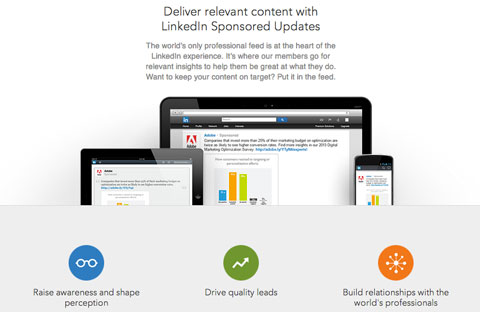
linkedin sponsored updates
Explore paid options to boost your visibility and success on social media.
LinkedIn also offers opportunities to reach specific audiences. You can buy advertising or use the sponsored updates feature to increase your brand’s visibility.
Even if your budget is small, don’t dismiss social advertising. Used strategically it can produce great results.

#7: Lather, Rinse, Repeat

The last step is the most critical: Measure and analyze your results.
Tracking performance data is the best way to identify which tactics are working and which aren’t. A few things to watch are growth, engagement and sharing.
Most social media networks have tools you can use to track and measure your performance.
Google Analytics is a popular and easy-to-use option for monitoring traffic and interactions on your website or blog. Keep track of which social media channels are driving the most traffic to your site.
To stay on top of your social media plan, review your metric reports regularly (at least once a week). Every 2 or 3 months, step back and evaluate the big picture. Make adjustments for anything not working, and try to recreate the things that are.
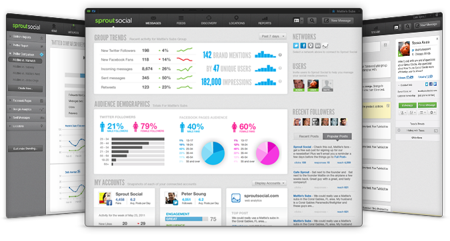
Tool Tip: Sprout Social creates easy-to-understand social media reports that can help you evaluate your social media performance. You can even compare your success to your competitors’.
sproutsocial reports
Sprout Social has excellent reports to help you track and manage your social media performance.
Some Final Thoughts
When using social media for your startup or small business, the most important thing to remember is that social media is a marathon, not a sprint.
Use this social media guide to start your social marketing efforts. Define your audience and choose the best platform to reach them. Do your research, integrate your social media icons and links, share your (and others’) content and keep track of how things are going. Follow those steps and you’ll be positioned for success!
What do you think? What tools do you use to reach your target audience? What challenges have you had to overcome? Do you have tips to share? Tell us your thoughts so we can learn together!

Images from iStockPhoto.