
Interested in improving your YouTube marketing?
Looking for ways to drive more views or engagement?
Adding a YouTube card to your videos creates a clickable call to action (CTA) that prompts viewers to respond.
In this article, you’ll discover how to create and use YouTube cards in your business videos.
Why YouTube Cards?
YouTube cards are the solution for driving actionable results from your video content. They let you add more visual components with underlying objectives to your YouTube videos instead of just annotations, making your videos more interactive.
The cards can appear at any point in your video, and can include images, outside links, and even content that’s downloaded when viewers click.
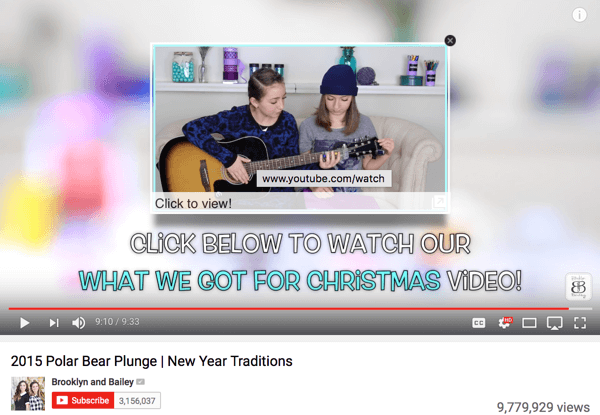
YouTube cards are interactive and can act as clickable CTAs that take viewers to another video, channel, or site.
You can add five different types of YouTube cards to your videos:
- Video or playlist: Promote your video content.
- Channel: Promote another channel.
- Donation: Feature a nonprofit or cause of your choice and encourage donations.
- Poll: Encourage viewers to engage in a multiple-choice poll.
- Link: Link to an approved website off of YouTube.
You can add up to five cards in one video. YouTube cards can be displayed on mobile devices and you can add them to TrueView ads.
Add YouTube Cards to Your Video
To create and add cards to your YouTube video, go to your YouTube Video Manager and find the video you want to add a card to. Click on Edit below the video’s title.
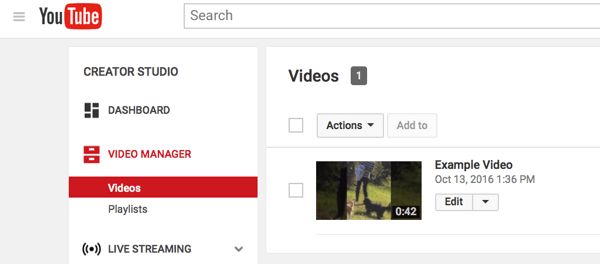
You can find the Video Manager in YouTube’s Creator Studio.
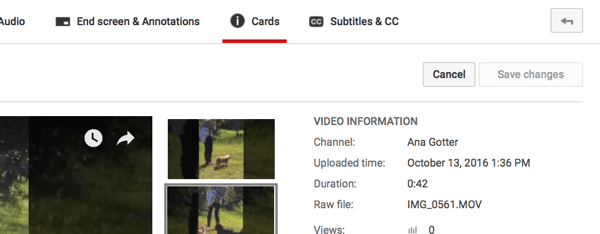
Click the Cards tab in the top navigation bar.
Here you can create new YouTube cards to add to your video. Click Add Card and then click Create to the right of the card you want to create.
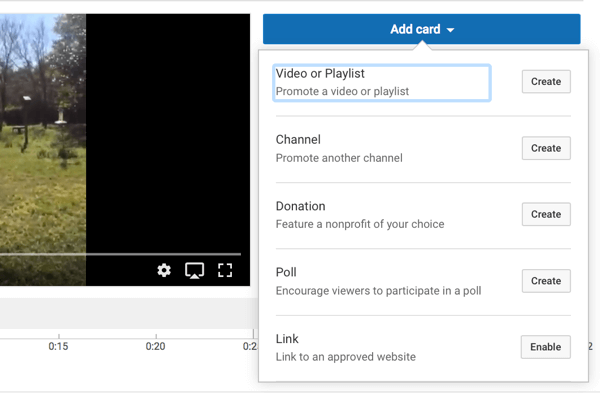
You can choose from five types of YouTube cards.
You’ll be asked to fill in the necessary information to create the card. For example, if you choose the Channel objective, enter the channel username or URL, a custom message, and teaser text.
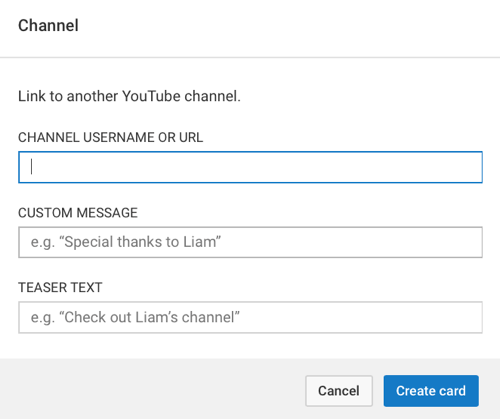
Different types of YouTube cards will ask for different information but they’ll all ask for brief teaser text.
Some cards have certain constraints. The Donation card, for example, requires the nonprofit to be an IRS-validated 501(c)3 public nonprofit. If the nonprofit isn’t in YouTube’s directory, there doesn’t seem to be another way to add it.
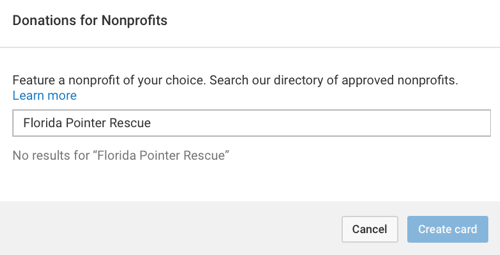
Nonprofits must be IRS-approved to be added to YouTube donation cards.
Once you’ve added the card to your video, you can adjust when the card will show up in the video. Just drag the card on the time marker below the video to the spot when you want it to appear.
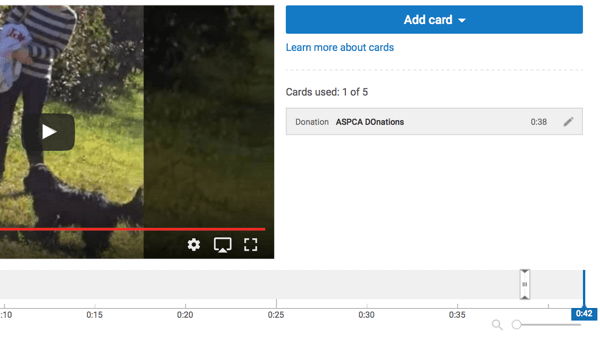
Drag the YouTube card’s icon on the time marker to the spot when you want it to appear.
After you set up the first card, you can add up to four more cards to the video. Watch the video and make sure that the cards appear where you want them to before you publish and move on.
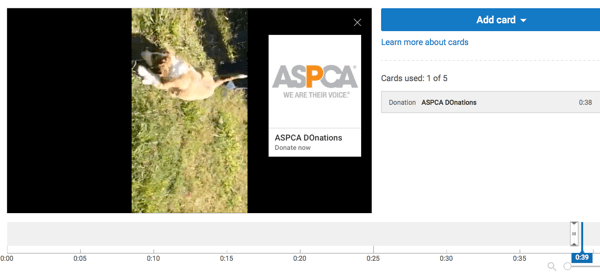
Preview the video and YouTube card before you publish. Also double-check for typos and errors.
4 Ways to Use YouTube Cards in Your Videos
Businesses can use YouTube cards in a variety of ways, such as to drive sales for a product or leads to a landing page. But if you really want to stand out and leave an impression on viewers, consider one of the suggestions below.
Note: When using YouTube cards for business, there are a few additional general best practices to keep in mind:
- Place cards that are meant to direct users somewhere else (including other videos) toward the end of the video. While there are exceptions to this, you typically want viewers to finish watching your video before sending them elsewhere.
- Keep the cards relevant. Only place cards that send users to a landing page on relevant videos. If the video isn’t relevant to the landing page, send users to a second video that is relevant, bridging the gap.
Send Viewers to the Next Video in a Series
If users subscribe to your YouTube channel, they’ll be alerted whenever you upload new content. This has always made YouTube the best social media platform to release a video series that requires viewers to see each part.
Using YouTube cards to send users to the next video in the series (or to the playlist of the series) will help you get more views on the collection of videos overall.
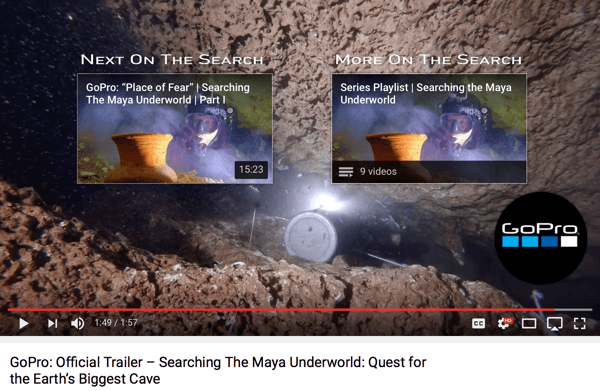
Including both a YouTube video card and a playlist card will help drive playlist subscriptions and video views.
GoPro’s “Searching The Maya Underworld” series used both strategies in one video. At the end of the trailer promoting the series, they added two different cards to increase viewership.
The first card sends viewers to the next video. The second card sends viewers to the series playlist, which they can subscribe to. If users come into a series midway, a playlist card can also help them backtrack to see the content they missed.
Direct Viewers to an Influencer’s Content Featuring Your Product
Influencer marketing is an effective way to lend credibility to your business and get a lot of attention quickly. YouTube cards can help you capitalize on this.
Feature industry influencers in your YouTube videos and then use a card at the end to send viewers to their channel or one of their videos. This works a lot like guest posting on blogs; you both benefit.
Few businesses have mastered influencer marketing quite like Red Bull, so it’s no surprise that their YouTube marketing reflects this. The under 2-minute video in the image below shows athlete Shane McConkey in action.
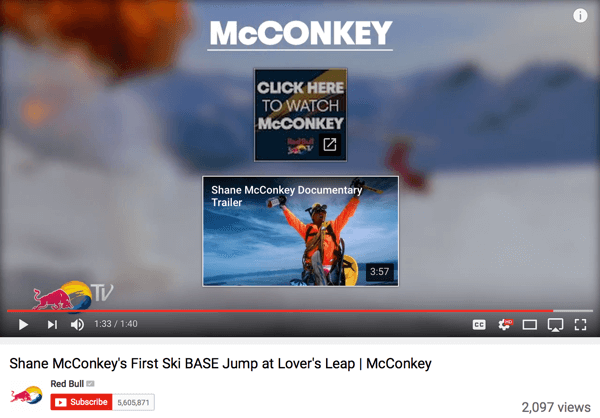
Influencer marketing can be just as powerful on YouTube as on any other social platform.
At the end of the video, a YouTube card appears with a link to Shane McConkey’s documentary trailer. This is a solid incentive for an influencer to contribute to a video, helping you connect with new audience members.
Get Viewer Input to Drive Content Development
Use polls for a truly interactive experience and to drive engagement. They also let you gather opinions on what content viewers want to see next.
Highlight a Nonprofit You Support
Charitable actions and giving back can have positive impacts on your business’s reputation. While most YouTube cards prioritize driving new leads and sales (which are smart decisions), some businesses produce entire videos dedicated to highlighting nonprofits, accompanied with a donation card at the end.
One great example is VlogBrothers‘ participation in Project for Awesome, which encourages users to create videos talking about a nonprofit and why it’s important to them. A donation card at the end of the video makes it easy for users to make a financial contribution. The nonprofit gets a boost and some great donations, and the business looks good for helping give back.
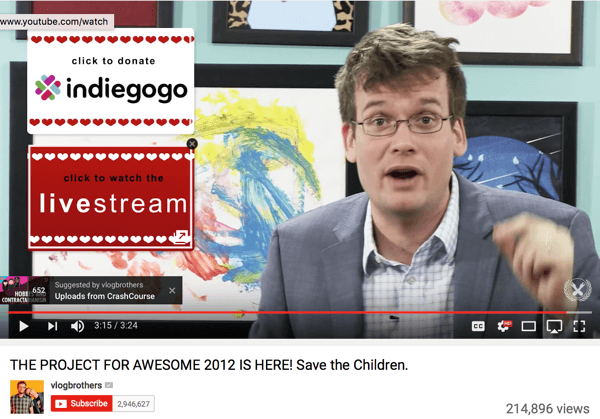
Charitable actions can improve a business’s reputation and can be especially powerful for small businesses in tight-knit communities.
Final Thoughts
On social media, interactive content is becoming essential to capture users’ attention, and YouTube cards are designed to do just that. They can drive specific actions or add more depth to your video. Because videos are dynamic and engaging on their own, cards serve as a fantastic touchpoint that will appeal to users and help you build rapport.
Whether you’re sending viewers to your blog to learn more or using a poll to make your videos more interactive, YouTube cards are strong tools for marketers.
What do you think? How will you use YouTube cards to advance your social media marketing? What will you optimize for? Share your thoughts, knowledge, and experience in the comments below!
Source
Source

